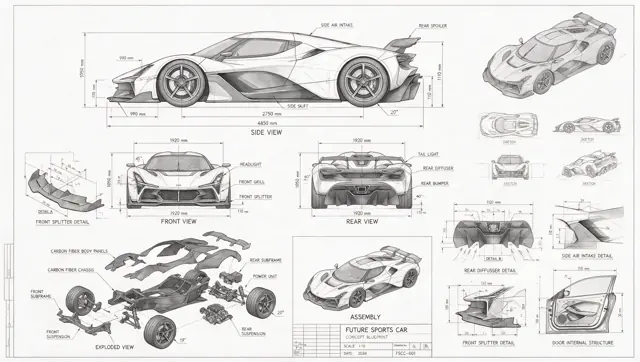
A technical drawing of a futuristic sports car in blueprint style. Include line drawings of the sports car from the front, side, and rear views, exploded parts sketches, parts assembly diagrams, and structural diagrams of disassembled components. Use abundant lines and measurement values to indicate the dimensions of each part, with grayscale tones expressing the overall sketch relationship. In addition to the main design, also show scattered thumbnails from different angles.
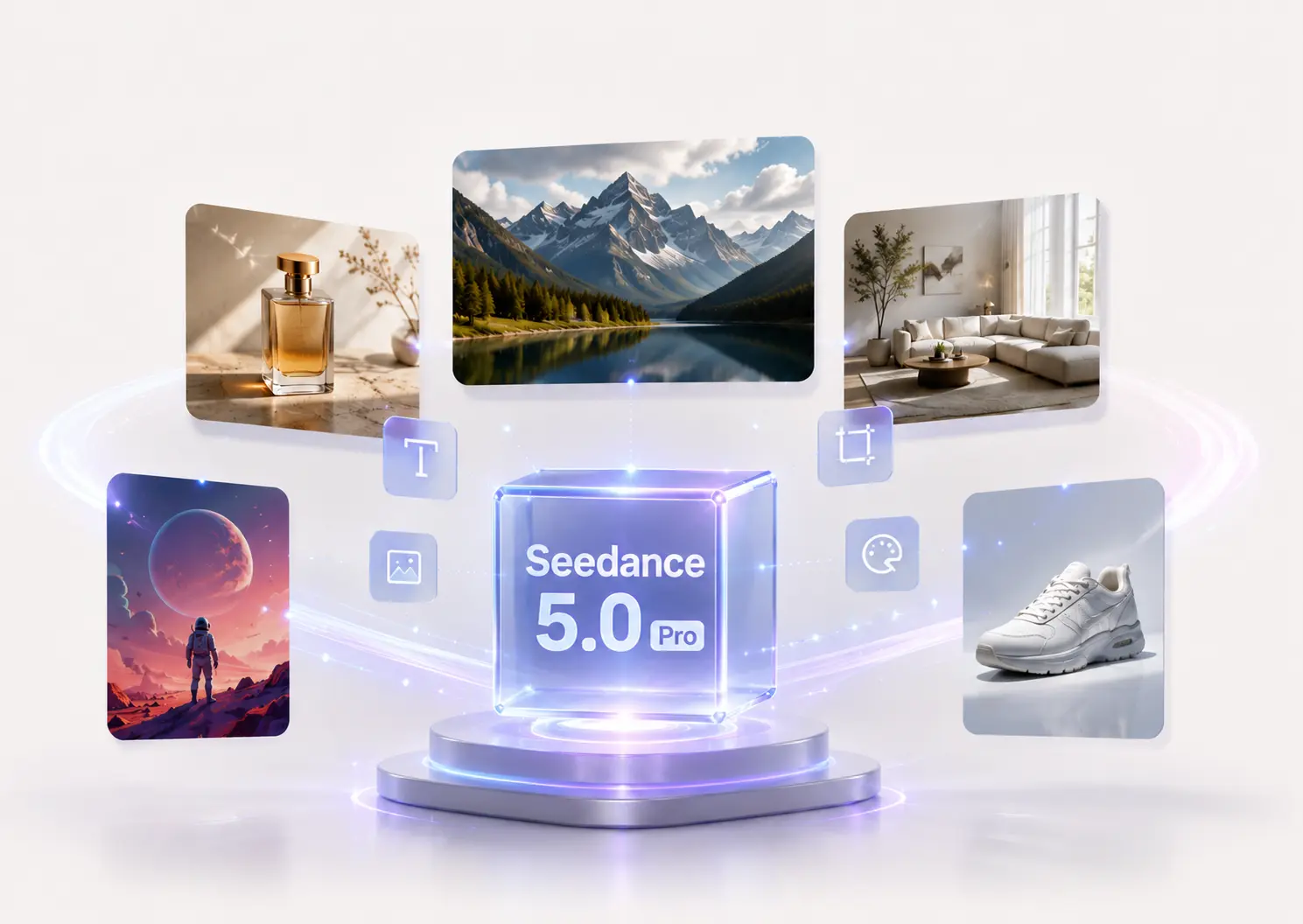
Seedream 5.0 ProAI Image Generator
Beyond Generation. It Understands Design.
Generate and refine professional visuals with prompts and reference images.
Split one image into a background and transparent foreground layers, up to 17 images.
Upload one PNG or JPEG image to start.
Seedream 5.0 Pro image examples
Explore reusable prompts for infographics, product campaigns, editorial visuals, photography, and multilingual design. Click an example to load its prompt and source image when available.
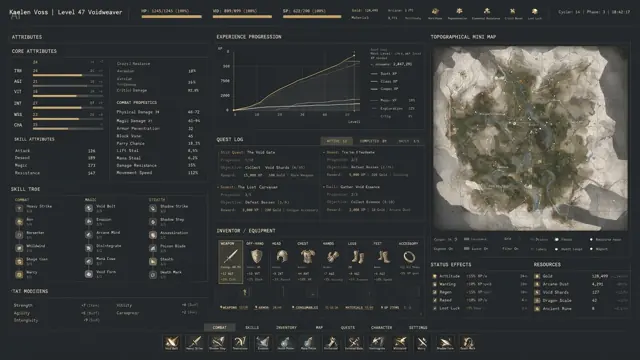
An extremely complex, highly information-dense RPG character interface. The image includes dense columns of character stats, complex line graphs for experience progression, and a massive topographical mini-map. Aesthetic style: high-end industrial functionalism. Deep matte slate-gray background. Crisp white monospaced fonts. Restrained color palette, using muted gold, with 1px grid lines separating all data. Extremely rich in detail.
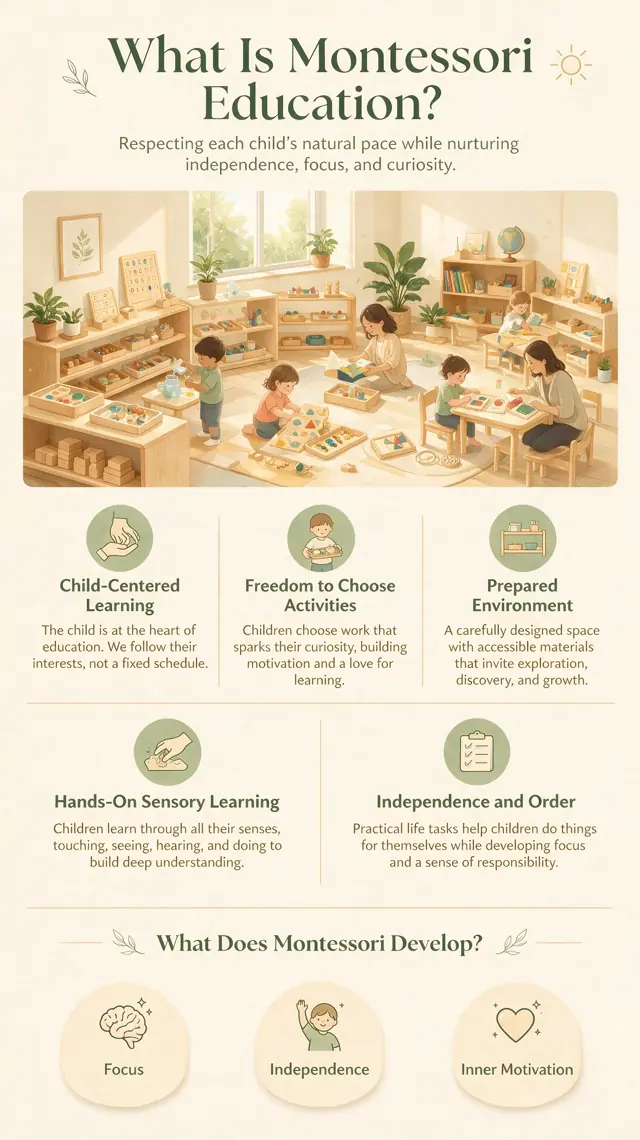
Vertical 9:16 educational infographic poster, topic: “What Is Montessori Education?”, designed for parents, warm, friendly, professional, and easy to understand. Soft color palette: warm ivory, light wood, sage green, and creamy yellow; clean white space, modern minimalist layout.
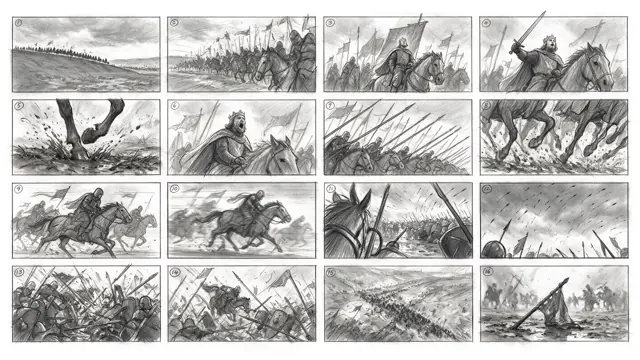
Generate a 4x4 cinematic storyboard with 16 separate panels in total. Each panel has a clear black border, arranged from left to right and top to bottom, with a small number 1–16 marked in the upper-left corner of each panel. The theme is a medieval cavalry charge. The overall style is a professional film-production storyboard sketch, drawn in graphite pencil, grayscale, and a director’s storyboard texture.
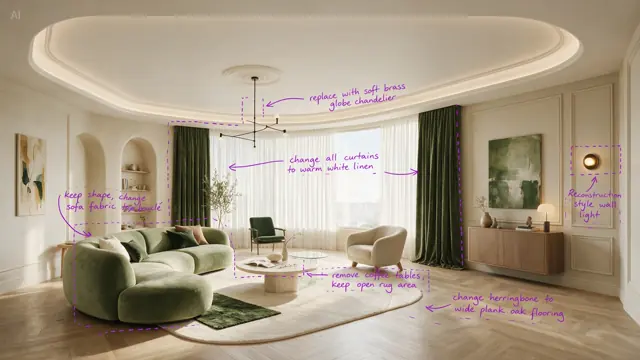
Perform precise edits based on the 6 purple boxes and handwritten English annotations in the original image. The goal is to make the living room warmer, lighter, and more realistic.
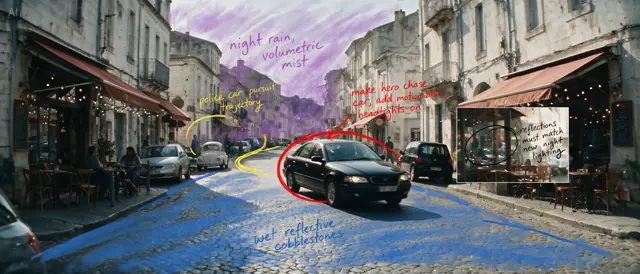
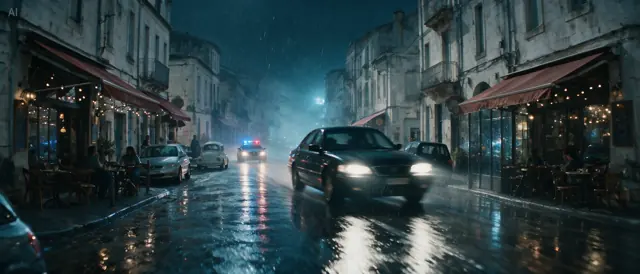
Based on all the annotations in the image, reconstruct the daytime European street into a cinematic rainy-night car chase scene. Turn the black sedan circled in red into the main high-speed chase vehicle, ......, and output a clean cinematic widescreen still, ultra-realistic, strongly narrative, with consistent complex lighting.
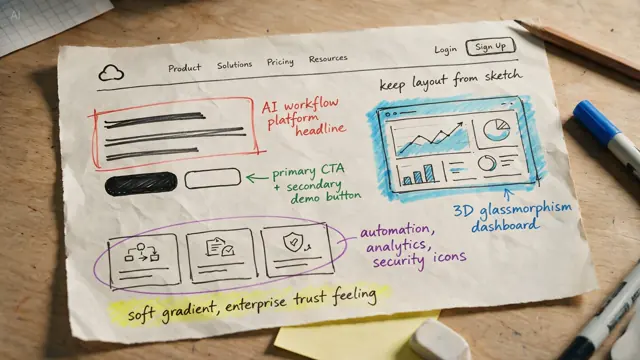
Transform this annotated hand-drawn sketch into a publishable premium SaaS website hero section design, strictly preserving the layout structure of the sketch. Generate a clear English headline in the red-box title area: “Orchestrate AI Workflows at Scale,” with a short subtitle.
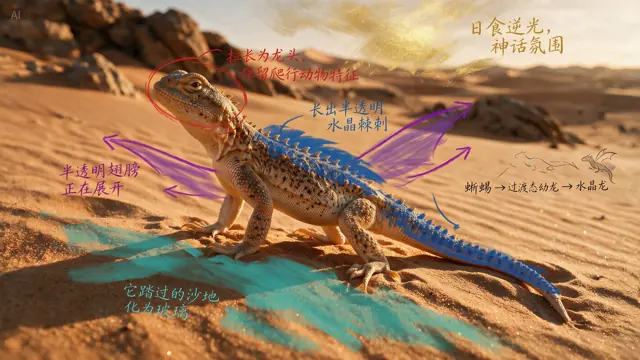
According to the annotations, evolve the real desert lizard into a crystal dragon while preserving the biological plausibility of its structure. ......, output a cinematic image that seamlessly blends real photography with a fantasy creature.
Realistic family-life photography. A Black father is sitting on the living room carpet, combing his young daughter’s hair. The father wears a simple white T-shirt and sweatpants, with a focused expression. The little daughter sits on a small stool in front of him, wrapped in a towel and holding a toy.
Using the provided image of the two women at the tennis court as the base image, change both women’s makeup into a sleek high-fashion runway beauty look, and change their hair into polished, glossy, slicked-back runway hairstyles.
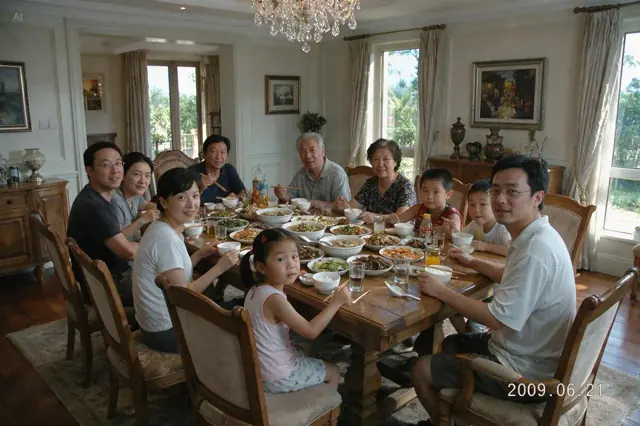
Generate a photo of a family of 11 sitting together for a meal in a large villa. Everyone is looking at the camera. Add a timestamp in the bottom-right corner: 2009.06.21.
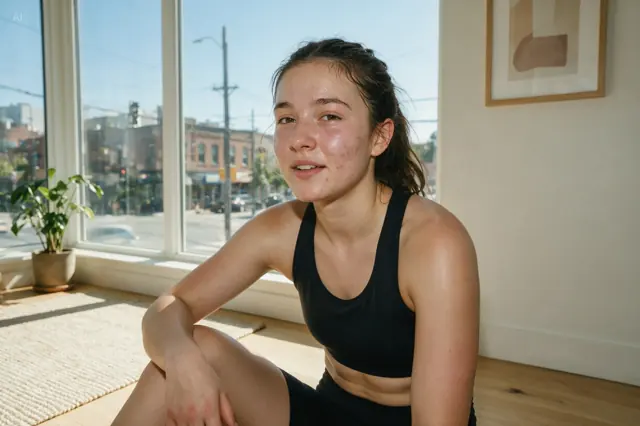
Remove the spots, acne marks, and sweat beads from the model’s face. Using the left side of her face as the reference, adjust both sides of the face to be symmetrical. Then slightly lengthen the neck. Keep all adjustments realistic and natural, avoiding excessive skin smoothing or deformation.
Crea una infografía vertical 4:5 sobre la cultura del Día de los Muertos en México. Usa ilustraciones claras de altar, flores de cempasúchil, calaveras de azúcar, velas, pan de muerto y fotografías familiares. (Create a vertical 4:5 infographic about the culture of Día de los Muertos in Mexico. Use clear illustrations of an altar, marigold flowers, sugar skulls, candles, pan de muerto, and family photographs.)
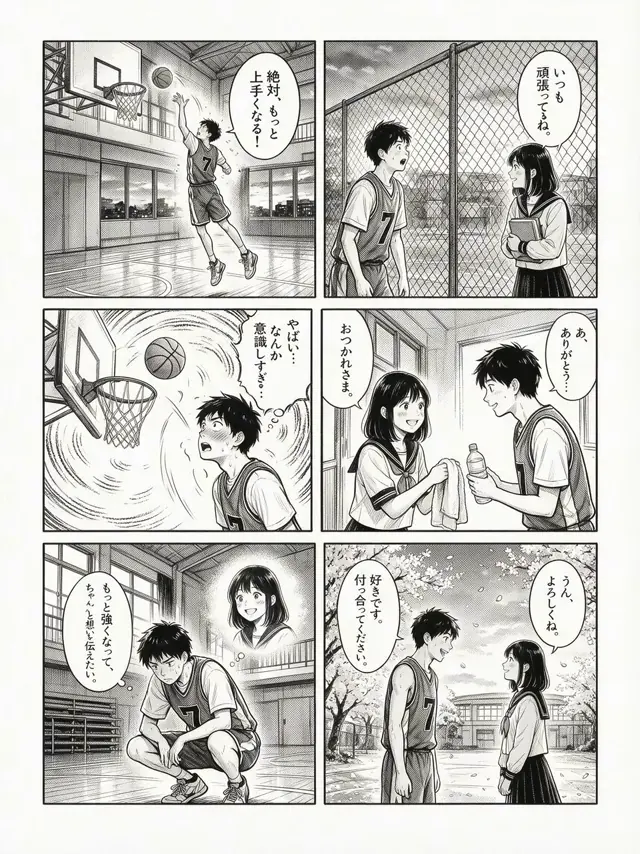
日本の6コマ漫画で、バスケットボールが大好きな高校生男子が、ある女生徒に恋をし、努力と成長を経て想いを伝える青春ラブストーリー。白黒のみで、クリーンな手描きの墨線で描かれている。(A Japanese six-panel manga about a high school boy who loves basketball, falls in love with a female student, and, through effort and personal growth, eventually expresses his feelings. Drawn only in black and white with clean hand-drawn ink lines.)
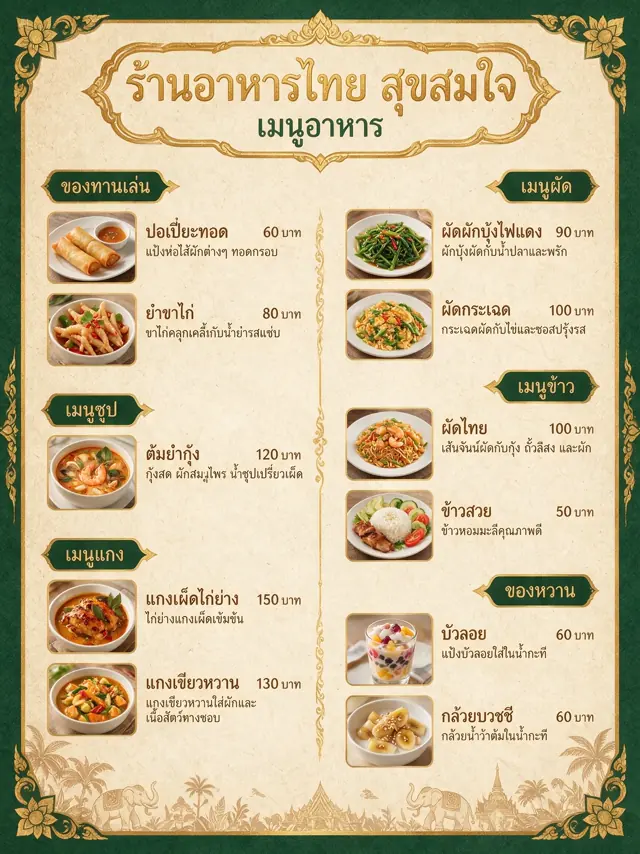
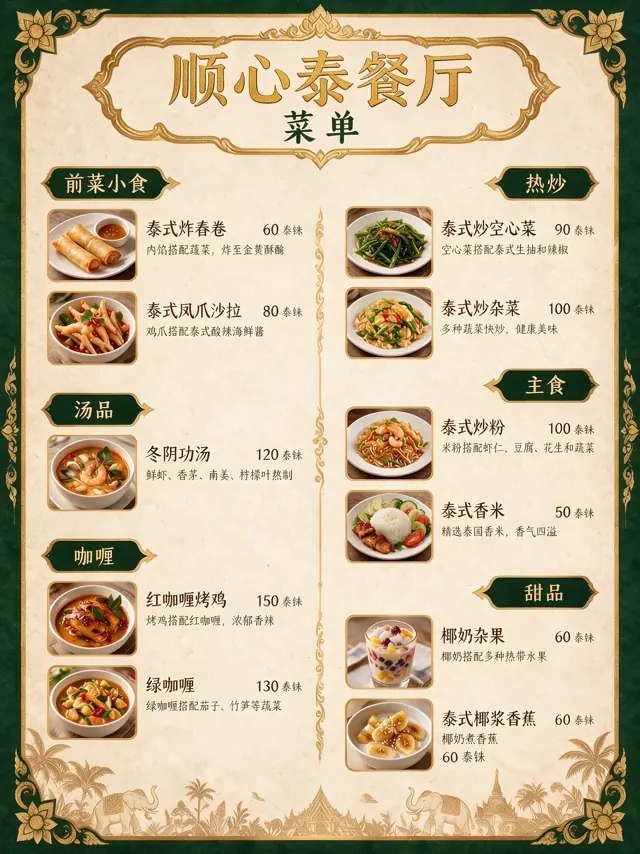
Translate the menu into Chinese.
Model overview
What is Seedream 5.0 Pro?

Seedream 5.0 Pro is ByteDance Seed's multimodal image generation model for advanced visual reasoning, professional content creation, and production-quality image workflows. It is designed to understand complex prompts, organize visual structure, render detailed scenes, and support more controllable image creation than a basic text-to-image model.
For creators, marketers, designers, and ecommerce teams, the practical value is simple: Seedream 5.0 Pro helps turn a detailed creative brief into a usable image. Instead of stopping at a rough concept, it can support polished outputs such as product ads, information-rich graphics, localized posters, cinematic scenes, and reference-guided visual variations.
Try Seedream 5.0 Pro with your own promptFour ways Seedream 5.0 Pro understands design
From information-heavy visuals to mark-guided edits, realistic photography, and multilingual layouts, these four capabilities turn creative direction into usable design work.
High-Density Infographics
Organize charts, labels, timelines, explanatory text, and complex layouts into a clear visual for education, professional communication, and specialized content.
Interactive Editing
Upload a source image, then mark the target with points, regions, sketches, or arrows. Reference those marks in your prompt to guide a focused edit and clarify what should stay unchanged.
Photographic Visual Quality
Recreate convincing physical light, shadows, reflections, material detail, and natural skin texture for product, portrait, and cinematic visuals.
Native Multilingual Generation
Prompt and generate image text across a dozen widely used languages for localized posters, layouts, and international creative workflows.
Where Seedream 5.0 Pro stands out
Use Seedream 5.0 Pro when the image needs to do a job: sell a product, explain a concept, localize a campaign, or turn a rough direction into a polished visual.
Product ads and ecommerce visuals
Create polished product scenes with controlled lighting, clear composition, realistic materials, and space for copy. Ideal for campaign mockups, product detail visuals, and social ad concepts.
Infographics and educational images
Build visual explainers with diagrams, labels, icons, timelines, and structured layouts for teachers, content teams, newsletter writers, and B2B marketers.
Localized marketing campaigns
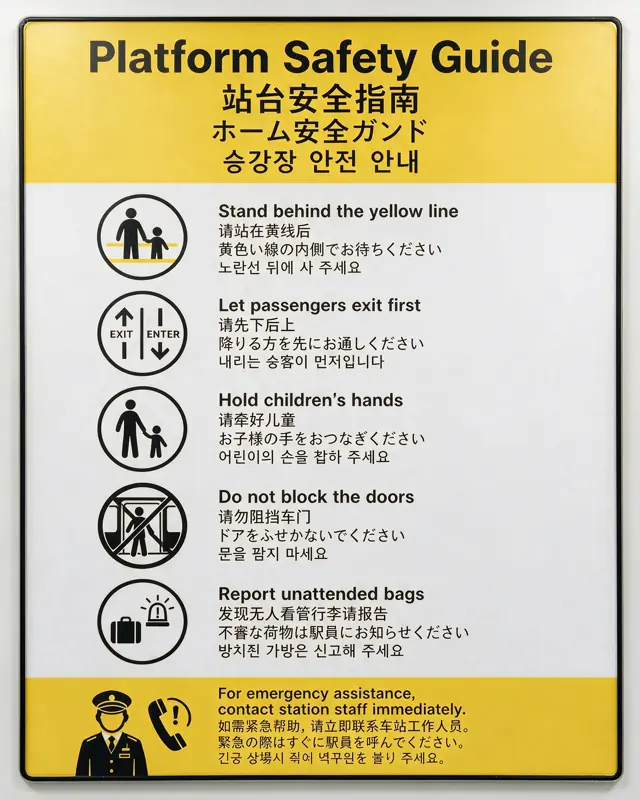
Explore visual concepts for different languages and markets. Use multilingual prompts to create localized campaign directions, then review text accuracy before publishing.
Brand concept exploration
Turn a creative direction into multiple visual routes: premium, playful, technical, cinematic, editorial, or realistic. Use reference images to keep outputs closer to your brand world.
Pitch decks and visual storytelling
Generate clean visuals for strategy decks, product narratives, storyboards, concept boards, and investor presentations when stock imagery is too generic.
Reference-guided image editing
Use prompts and reference images to reshape an existing visual direction. This works best when you can describe what should stay consistent and what should change.
How to create stronger Seedream 5.0 Pro visuals
Seedream 5.0 Pro works best with prompts that read like a creative brief. Tell it what the image is for, what must appear, how the composition should feel, and what details should stay controlled.
A stronger prompt structure
- 1Subject: what the image is about.
- 2Purpose: ad, poster, infographic, product shot, storyboard, portrait, or UI concept.
- 3Composition: camera angle, layout, hierarchy, focal point, and negative space.
- 4Style: photographic, editorial, cinematic, technical, minimalist, premium, or playful.
- 5Material and lighting: glass, metal, skin texture, fabric, daylight, studio light, and reflections.
- 6Text requirements: exact text, language, placement, and hierarchy.
- 7Output shape: 1:1, 4:5, 9:16, 16:9, or another supported aspect ratio.
- 8References: what to preserve from uploaded images and what to change.
Example Pro prompt
Create a 4:5 premium product ad for a matte black smart water bottle. Place the bottle on a wet basalt stone surface with soft side lighting, subtle mist, realistic water droplets, and a clean headline area at the top. Mood: calm, expensive, outdoors-ready. Add the headline "Hydration That Keeps Up" in crisp white sans-serif type.
Prompt tips
- Name the use case, not only the style.
- Give the model hierarchy: what matters first, second, and third.
- Specify text exactly, then review generated text before publishing.
- Use reference images when product shape, brand look, or character consistency matters.
- Keep prompts focused. Very long instructions can scatter attention.
- Pro generates one image at a time, making it a better fit for refining a single finished result.
Seedream 5.0 Pro vs Seedream 5.0 Lite
Seedream 5.0 Pro and Seedream 5.0 Lite serve different creative workflows. Lite is useful for broad exploration and efficient generation. Pro is the better fit when the image needs professional structure, stronger control, detailed realism, or a polished single result.
Choose Seedream 5.0 Pro when the final image has to be convincing enough for a campaign, client presentation, ecommerce page, or content asset. Choose Seedream 5.0 Lite when you want to explore more variations quickly before deciding which direction deserves a Pro pass.
Choose a Seedream 5.0 Pro plan
Try every model with free credits, then choose a monthly usage level. Annual billing saves 30%, while credits are still issued and reset monthly.
Free
For personal evaluation of all three models
- 18 one-time trial credits · valid for 7 days
- Loading current credit rules...
- Access to Seedream 4.5, 5.0 Lite, and 5.0 Pro
- Text-to-image and supported reference-image workflows
- Generation history and image downloads
- No plan-level watermark added by this platform
- Clearly failed tasks return charged credits
- For personal evaluation; commercial rights are not advertised
- Public contact channel for account, security, and payment issues
Starter
Save 30%For steady, low-volume individual creation
- 300 credits issued and reset monthly
- Loading current credit rules...
- Access to Seedream 4.5, 5.0 Lite, and 5.0 Pro
- Text-to-image and supported reference-image workflows
- Generation history and image downloads
- No plan-level watermark added by this platform
- Clearly failed tasks return charged credits
- Commercial projects subject to platform terms
- Email support for billing and generation failures
Creator
Most PopularSave 30%For creators producing marketing, content, and ecommerce assets
- 1,500 credits issued and reset monthly
- Loading current credit rules...
- Access to Seedream 4.5, 5.0 Lite, and 5.0 Pro
- Text-to-image and supported reference-image workflows
- Generation history and image downloads
- No plan-level watermark added by this platform
- Clearly failed tasks return charged credits
- Commercial projects subject to platform terms
- Email support for billing and generation failures
Studio
Save 30%For high-volume campaign assets, client projects, and professional production
- 3,600 credits issued and reset monthly
- Loading current credit rules...
- Access to Seedream 4.5, 5.0 Lite, and 5.0 Pro
- Text-to-image and supported reference-image workflows
- Generation history and image downloads
- No plan-level watermark added by this platform
- Clearly failed tasks return charged credits
- Commercial projects subject to platform terms
- Email support for billing and generation failures
Seedream 5.0 Pro FAQ
Answers for creators comparing Seedream 5.0 Pro, testing online generation, and deciding whether Pro fits their workflow.
What is Seedream 5.0 Pro?
Seedream 5.0 Pro is ByteDance Seed's multimodal image generation model for advanced reasoning, professional content creation, and production-quality image workflows. It is designed for complex prompts, structured visuals, realistic textures, multilingual creative generation, and more controllable image creation.
Can I use Seedream 5.0 Pro online here?
Yes. This website is being built as an independent online image generation tool for Seedream 5.0 Pro workflows. You can write a prompt, add reference images when supported, and generate images directly in the browser.
Does Seedream 5.0 Pro support reference images?
Yes. You can upload one or more reference images—up to 10—and describe what to preserve or change. With Seedream 5.0 Pro, use Mark image to add points, regions, sketches, or arrows, then reference those marks in your prompt.
How many images can I generate at once with Seedream 5.0 Pro?
Seedream 5.0 Pro generates 1 image at a time on this site, making it ideal for refining a single result. To compare multiple results at once, switch to Lite and generate up to 4 images.
What is the difference between Seedream 5.0 Pro and Seedream 5.0 Lite?
Seedream 5.0 Pro is better for professional production, high-density infographics, mark-guided editing, photographic visuals, multilingual creative assets, and one strong final image. Seedream 5.0 Lite is better for faster exploration, comparing multiple outputs, and developing several creative directions at once.
What can I create with Seedream 5.0 Pro?
You can create product ads, ecommerce visuals, infographics, localized posters, concept art, realistic scenes, social media creatives, pitch deck visuals, and reference-guided image variations.
How do Seedream credits work?
Seedream 4.5 costs 4 credits per output, and Seedream 5.0 Lite costs 4 credits per output. Seedream 5.0 Pro costs 6 credits at 1K or 12 credits at 2K. Every started pair of reference images adds 1 credit per request. Multiple outputs multiply the model base charge, and clearly failed tasks return the charged credits once. Subscription credits are issued and reset monthly, including on annual plans.
Can I use Seedream 5.0 Pro images commercially?
Paid plans may support commercial projects under this platform's terms, but you are responsible for clearing any third-party rights, trademarks, likeness rights, brand assets, and other permissions required for your use case.
Does Seedream 5.0 Pro render text perfectly?
Seedream 5.0 Pro is designed for stronger text rendering and multilingual generation, but AI-generated text can still require review. Always check spelling, layout, brand names, legal text, and localized copy before publishing.
How do I get better Seedream 5.0 Pro results?
Write prompts like a creative brief. Include subject, purpose, composition, style, lighting, materials, text requirements, aspect ratio, and what should stay consistent from any reference images.
Still have questions? Contact us at support@seedream-5-pro.com
Create your first Seedream 5.0 Pro image
Start with a prompt or upload a reference image. Use Mark image to point out the target, then turn your direction into a polished infographic, focused edit, photographic image, or multilingual creative asset.